Showing posts with label Internet Tools. Show all posts

Tuesday, 13 September 2011

5 Million Dollars for 1 Terabyte?


"5 Million Dollars 1 Terabyte" (2011) is a sculpture consisting of a 1 TB Black External Hard Drive containing $5,000,000 worth of illegally downloaded files. A full list of the files with clickable download links can be found here.


source

Around The Web -

Monday, 5 September 2011

World's First Virtual Store


A major South Korean retailer has opened what it appears to be the world's first virtual store geared to smartphone users, with shoppers scanning barcodes of products displayed in a Seoul subway station. Homeplus, the nation’s second largest discount chain, is offering 500 items including food, electronics, office supplies and toiletries at its "store" at Seolleung station in the south of the city of 10 million.


Seven pillars and six platform screen doors have been plastered with images of life-size store shelves filled with goods -- such as milk, apples, a bag of rice or school backpacks -- which each carry a small barcode. Shoppers download a related application on their smartphone and make purchases by taking photos of the barcodes.


"You place an order when you go to work in the morning and can see the items delivered at home when you come home at night," said a spokeswoman for Homeplus.
In fact, consumers don’t have to be anywhere near the virtual store. For example, if you want to order replacements of a bottle of water that you have in your hand, you don’t have to stop by the subway station. You simply scan the bottle’s barcode with the Homeplus app. The products are delivered later to home or office.
Currently, only Android smartphone users will be able to use the service that launched last week. Not that Homeplus hasn’t made an app iPhone, it’s just Steve Jobs and Co. hasn’t approved it yet.


Around The Web -

Saturday, 20 August 2011

50+ Dictionary & Reference Sites


Dictionary sites


Allwords.com – English dictionary with search options in multiple languages.

alphaDictionary.com – Search for word meanings from more than 992 dictionaries.


AskOxford.com – The online version of the famous Oxford dictionary.

Cambridge Dictionary Online – Online English dictionary from Cambridge.

Dictionary.com – The ultimate website with thesaurus, word of the day and other features.

Dictionary.hm – An easy way to find the dictionary meanings of words.

DICT.org – Consolidates word meanings from various dictionary and thesaurus sites on the internet.


Freedictionary.biz – Search for dictionary meanings in English language and other popular languages.

Infoplease Dictionary – Dictionary search with extensive results for many words.

Merriam-Webster Online – Excellent online dictionary with extra features like word of the day, word games and audio pronunciation of the words.

OneLook Dictionary – Search for word definitions, their meanings and look up phrases from multiple dictionaries.

Online Etymology Dictionary – Search for etymologies of words to find out their history.


Ultralingua.com – Multilingual dictionary with translation options from English to French, Spanish and other European languages.

Vocabulary Building Dictionary – Users can look up word definitions and build their vocabulary.

Wordsmyth – Search for word meanings and find new tools to improve a child’s vocabulary.

YourDictionary.com – A free online dictionary with features like spelling check, pronunciation, thesaurus etc.


Encyclopedia and Reference sites


An Encyclopedia for Curious Minds – Resource site for geeks that contains articles, answers to questions and puzzles.

About.com – The biggest reference site on the internet with information on a large variety of topics.

Acronym and abbreviation dictionary – Comprehensive dictionary of abbreviations, acronyms and initial letters of words.

Answers.com – Excellent site finding answers to questions on any subject be it technology, news or even sports for that matter.


Britannica.com – Trusted source of information for a wide variety of topics.

BuzzWhack – Dictionary of business and slang terms.

Citizendium – An encyclopedia project with the philosophy of generating a reliable knowledge base by users.

Columbia Encyclopedia – One of the leading encyclopedias produced the world over.

eHow.com – Over 35,000 articles by experts on various subjects.


Encyclopedia.com – Magazine articles, encyclopedia, dictionary…everything is there in one place.

MSN Encarta – Dictionary, thesaurus and translation engine from Microsoft.

Refdesk.com - Covers information from multiple places and is the best site consolidating and collecting facts at a single place.

Reference.com – Online encyclopedia, dictionary and thesaurus.

Rhymezone.com – Find out rhyming words and phrases.


W3Schools Online – Excellent collection of tutorials in various technology subjects.

WebReference.com – A reference site for web-based technologies.

Whatis.com – The biggest encyclopedia of Information technology.

WikiHow.com – Free resource assisting world wide users by providing solutions to daily problems.

Wikipedia – User generated free encyclopedia of topics written by contributors from all over the world.


wiseGEEK.com – Articles containing answers to most popular questions.


Visual
Metaglossary.com – More structured and organized way to find meanings of words. It aggregates latest results together.

The Visual Dictionary – User generated image catalog of over 3000 words.

Thinkmap Visual Thesaurus – Nice way to research and explore connected meanings of words with visual aid.


Visual dictionary – Visual dictionary with clear image search results for words.

Visuwords.com – Graphical dictionary displaying visual connections between words.


Others
Askaword.com – Spellchecking, thesaurus, dictionary, and encyclopedia for your portable device.

A Word a Day – Best way to build vocabulary of words, it provides users with a unique word everyday.


Chuala.com – User generated dictionary for pronouncing words.

Google’s translation dictionary – Google’s translation engine allows users to translate English words to those in other languages.

Internet Archive – Comprehensive and consolidated glossary of information on the internet like audio, video, various websites etc.

Ninjawords.com – Get quick results for meanings of words.

Query by example – Enter words, phrases and find out their synonyms and related meanings.


SpellWeb.com – Check the world wide web for spellings of various words.

Urban Dictionary – A dictionary of slang words.

VoyCabulary.com – It converts words on web-pages into links enabling users to easily look up their meanings in dictionary and other reference sites.

Word Source – A social dictionary; users rate for word meanings and the results are displayed on the basis of number of votes.

Around The Web -

Sunday, 31 July 2011

What happens on Internet in 60 Seconds?


The World Wide Web is growing almost in the speed-of-light. And it grows in a rate that on average 6 billion pages are added to the internet everyday.

Did You Know?

Did you know that every 60 seconds:
  1. The search engine Google serves more than 694,445 queries
  2. 6,600+ pictures are uploaded on Flickr
  3. 600 videos are uploaded on YouTube videos, creating another 25+ hours of content
  4. 695,000 status updates, 79,364 wall posts and 510,040 comments are published on Facebook
  5. 70 new domains are registered
  6. 168,000,000+ emails are sent
  7. 320 new accounts and 98,000 tweets are generated on Twitter
  8. iPhone applications are downloaded more than13,000 times
  9. 20,000 new posts are published on micro-blogging platform Tumblr
  10. The browser FireFox is downloaded more than 1,700 times
  11. The blogging platform WordPress is downloaded more than 50 times
  12. WordPress Plugins are downloaded more than 125 times
  13. 100 accounts are created on LinkedIn
  14. 40 new questions are asked on YahooAnswers
  15. 100+ questions are asked on Answers.com
  16. 1 new article is published on Associated Content, the world’s largest source of community-created content
  17. 1 new definition is added on UrbanDictionary
  18. 1,200+ new ads are created on Craigslist
  19. 370,000+ minutes of Skype voice calls
  20. 13,000+ hours of music streaming on Pandora
  21. 1,600+ reads are made on Scribd

Added bits


Everyday, 15 petabytes of new information are generated.
The amount of information today is approximately 988 exabytes (equivalent to a stack of books from the Sun to Pluto and back.
Today, the processing power of the Web is almost equivalent to one human brain. By 2040, it will exceed the total processing power of all of humanity.

Around The Web -

Thursday, 21 July 2011

What the Hell's Google+?


Here are the 3 most important misconceptions that are NOT accurate about Google+:


  • Google+ is NOT a generic social network. Thus Google+ is NOT comparable to Facebook or Twitter. But it does hold the best of both worlds.


  • Unlike Twitter it DOESN’T matter how many people have you in their circles.


  • Google+ is NOT about anonymity.


  • Clearly, the question arises now is, What is Google+ exactly?.

    But before we answer that question, we really need to take two steps back to observe the history of Google to re-define our perspective.
    Now, let’s take a good look at Google’s Apps. Observe the image below as an example:


  • Gmail: The most diverse email system on the web to date. It is the absolute solution for your email needs, hosted on the Cloud.


  • Picasa: All your photos organized on the Cloud in a neat manner.


  • Documents and Spreadsheets: Your files, documents and spreadsheets on the Cloud.


  • YouTube: Your videos on the Cloud.


  • Google Reader: Your personalized newspaper on the Cloud.


  • Others: Google Maps, Shopping, Finance, Sites and many more Cloud based services.


  • So what is the common element of the points mentioned above?
    That would be the Cloud.

    The bottom line is that Google is clearly transitioning various elements of our life to the Cloud.
    There will be hardly any need of traditional software on a computer to operate on the Cloud. That is where Chrome OS comes in.
    This will immediately enable a person to:


  • Access their files from anywhere and from any computer without losing their privacy.


  • Peace of mind over everything being stored on the Cloud. All your files are accessible on any device with an Internet browser.


  • Whether you are prepared for it or not, the future of the computing is “Cloud computing.”
    Google is enabling you to do just that.


    Now let’s get back on the question: What is Google+ exactly?
    Here is how I describe Google+:


  • Google+ is the “Social Component” of the Google Ecosystem (family of Cloud products). It nearly completes and compliments all the other Google components. It is designed to implement social interactions on all your other Google entities.


  • Google+ is combining people and conversations with your own Cloud based elements (such as Photos) and ideas.


  • Google+ is making use of Circles to make sure you see the updates and conversations from the people who matter most to you. This is one innovative step, which “Facebook Friends Lists” and “Twitter Lists” is not on par with.


  • Google+ is conversation-centric. It is one of the best features that will keep it on its course.


  • Google+ for Business enables businesses to set competitive, interactive quality of conversations and updates with their customers.


  • So, there you have it. Google+ is not a single entity but it is part of Ecosystem being developed by Google.
    Google+ is the future social implementation of Cloud based computing around Google’s Apps.

    Around The Web -

    Wednesday, 13 July 2011

    Facebook for Every Phone App


    Facebook today announced Facebook for Every Phone. This would give users, even those without smartphones, access to Facebook from their mobile device. It will be compatible with various phones. Here's the word according to their post:

    Today, we're launching the new Facebook for Every Phone app, which offers a fast and comprehensive Facebook experience on over 2,500 different phones. This app not only includes Facebook’s most popular features, such as News Feed, Inbox, and Photos, but also enables you to upload photos and find friends from your phone’s contacts.  People all over the world can download the app by visiting m.facebook.com and scrolling down to the download link, or by entering d.facebook.com/install directly into their mobile browser. You can also find it in leading app stores, including GetJarAppia, and Mobile Weaver.

    They've collaborated with carriers all around the world in hopes of making it affordable for all users. Certain carriers are also offering free access for a limited time. Here is the list:


    1. •   Aircel (India)
    2. •   Airtel (India)
    3. •   Banglalink (Bangladesh)
    4. •   Beeline (Russia)
    5. •   Celcom (Malaysia)
    6. •   Etisalat (Egypt, Nigeria)
    7. •   Globe (Philippines)
    8. •   Idea (India)
    9. •   Indosat (Indonesia)
    10. •   O2 Telefonica (Germany)
    11. •   Reliance (India)
    12. •   Smart (Philippines)
    13. •   Smartfren (Indonesia)
    14. •   Telkomsel (Indonesia)
    15. •   Three (Indonesia, United Kingdom)
    16. •   TIM (Brazil)
    17. •   TMN (Portugal)
    18. •   Ufone (Pakistan)
    19. •   Vodafone (Turkey)
    20. •   XL (Indonesia)


    via facebook

    Around The Web -

    Thursday, 16 June 2011

    Best Apps For Your iPhone


    How about something useful? Something that helps you use your iPhone to its greatest potential?

    Here's a look at some apps that will let you make the most out of your iPhone
    whether it's your battery life, e-mail, texting or more.


    Battery

     There are, approximately, 8 gazillion applications that enable you to
    see how much battery life you have left. It's hard to say which is the
    best, as they all do pretty much the same thing. Many are free, and
    most of those have three stars; some are paid, and they range from
    three to three and a half stars, for the most part, in average ratings.


    So we chose to go with BatteryMagic, as it has both free and paid (BatteryMagicPro) versions, as the app has hundreds of ratings.


    Many of the battery apps have both free and paid versions and most do the same thing.

    BatteryMagic will tell you how much time you have left on your battery for:  
    • 3D Game Play

    • Game Play

    • Talk Time

    • 3G Internet

    • Wi-Fi Internet

    • Video Playback

    • Audio Playback

    • Standby Time

    • iPod Video Play Time

    • iPod Audio Play Time

        It'll also tell you how much time it'll take to full recharge your battery.

    The pro version adds the ability to tell if you'll be able to see a
    full-length movie with the battery life you have, a notification when
    your battery is fully charged, the ability to switch from 3-D to 2-D to
    conserve battery life when you don't need 3-D capability, plus skins to
    customize the battery image with colors, images or patterns (like
    zebras?).


    Unlock screen notifications

     Sometimes you need to check your to-do list or your reminders quickly
    and don't want the bother of unlocking your phone, navigating to the
    app and opening it. iNotify
    enables you to put certain notifications on your unlock screen so all
    you have to do is wake up your phone to see what's next on your list.

    You can customize colors and even set up different wallpapers through
    the app, for different to-do lists or goal-setting or other
    notifications, changing them out as you're done. Heck, you could put
    your grocery list on there if you wanted. It's 99 cents, too, so it
    won't break the bank.


    All-in-one
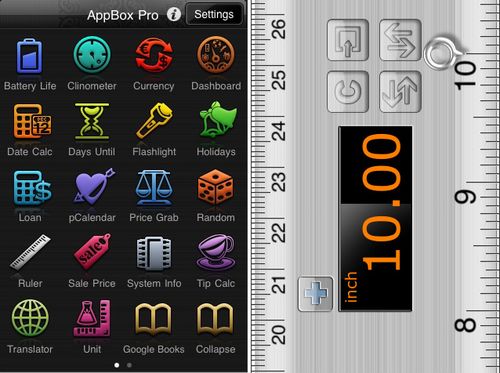
        AppBoxPro

    has gotten a lot of thumbs up for having a whole bunch of utlity apps
    in one: battery life, clinometer, currency converter (195 currencies),
    date calculator, countdown/days until, flashlight with adjustable
    brightness, holidays from 83 nations, loan calculator, periodic
    calculator, price grab, random number generator, ruler, sale price
    calculator, system info, tip calculator, 52-language translator and a
    unit converter with 17 categories.
      
    This month, the app is supposed to add customizable themes, a calculator, a strobe and new graphics to the flashlight, nine more languages to the translator, holidays from 11 more countries, and a "secure wallet" app. December should bring a dictionary.

    This app has gotten more than 2,500
    ratings and has a solid 3.5 average rating in the App Store. And right
    now it's 99 cents "for the holiday season," though it's usually $1.99.

    Wireless mouse/trackpad
      
    The AirMousePro lets you convert your iPhone into a wireless mouse or trackpad.

    It uses the phone's built-in accelerometer to translate your hand
    motions into mouse movements. The main uses it's touted for are for
    controlling your "home-theater PC" or for giving a presentation. Its
    features:

    • Accelerometer based mouse


    • Trackpad (full screen vertical and landscape modes)


    • Media keys and Web keys


    • Application notifications
      - Remote keyboard with modifier, function and arrow keys


    • Programmable hotkeys (can be set to run a program or keyboard combination)


    • Scroll pad


    • Multi-touch gestures (scroll & right click)


    • Password protection


    • Custom sensitivity settings


    • Foreign-language keyboards


    • Support for Bonjour or static IP


    • No screen size limitation. Works with multiple monitors

    Another app that has thousands of ratings, with a solid four stars for the current version. It costs $1.99 right now.


    Camera flash


    Many user complaints about the iPhone camera focus on the lack of a
    flash, so if you're not in good light, you're outta luck.

    There are a few apps that strive to fill this void: Flash for Free,
    a free app, has nine different flash effects and undo functions.

    Basically, you take your photo, apply the app to it and brighten it. It
    has more than 13,000 ratings and just two stars, but it seems that's at
    least in part due to a major bug in the previous iteration. It won't
    help if you took the photo at night, some remark in reviews, but if you
    have a photo that needs to be lightened just a wee bit, for free, you
    can't beat the price.


     Internet speed
    SpeedTest
    is the iPhone app of the well-known website, allowing you to test the
    speed on your ISP. This way, before you complain to your provider that
    your wireless speed is for the birds, you can test it to make sure it's
    not just your phone or a momentary blip.

    It's been used a lot; a free app, it has a solid 3.5 stars after nearly 23,000 ratings.
    Emoticons

    C'mon, you know you would prefer if your messages or notes showed
    actual emoticons instead of just the old-fashioned colon-dash-close
    parens when you send a text message on your phone.
        Enter iEmoticons,
    which does just that. Googly eyes, flowers, hearts, smileys and even a smiley with a SARS-like mask on it. After nearly 3,000 ratings, it has 3.5 stars in the App Store (99 cents) and it works on Notes, SMS texting, e-mail and other apps.


    WiFi locator


    Let's face it. AT&T doesn't have the top 3G network around.
    Fortunately, you don't have to completely rely on the phone network to
    use your iPhone, you can use a wireless connection.
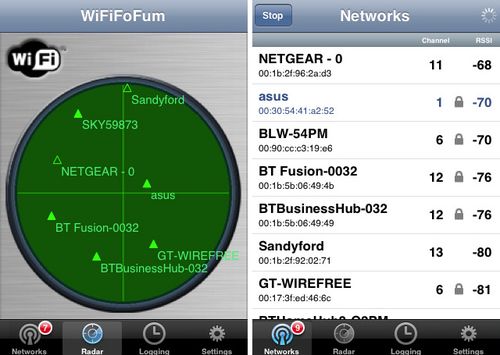
        WiFiFoFum scans for 802.11 networks and gives you a plethora of information about each it detects:
        • SSID
        • MAC
        • RSSI (signal strength, shown as a number or in an icon)
        • Channel
        • AP mode
        • Security mode
        • Available transmission rates


    You can then connect to the network of your choice, provided it's
    unlocked or you have the password. And so you don't have to go through
    the same process every time to figure out where the best Wi-Fi networks
    are, it allows you to create logs of access points. They can be viewed
    on the iPhone's maps app or you can send it by e-mail so you can access
    the information from your laptop - you just paste the link in the
    e-mail into Google Maps.

    You can save passwords, and the main list is sorted by signal strength, so you can easily see which networks to try first.

    For $2.99, the app has more than 500 ratings, averaging 3.5 stars.


    Diagnostics

    It can be frustrating when your iPhone is sluggish or is crashing and
    the first thing most people assume is that it's AT&T's fault. But
    it isn't always due to the not-best-3G network in the nation.
        System Activity Monitor allows you to check your:

    • Runtime (RAM) memory usage


    • Storage (Disk) usage


    • All running processes


    • CPU usage


    • WiFi and Cellular IP addresses


    • MAC addresses


    • Device information

    • Battery level


    The information will allow you to determine if you need to free up some
    memory, force-quit some apps or get rid of some apps.

    One testimonial claims Apple Tech Support suggested the user get SAM to
    help diagnose the problem he was having. It's $2.99 and has 3.5 stars
    after nearly 300 ratings.


    Available memory

    What if all you want to know is how much memory you have left on your
    iPhone? Whether you can download that Paper Toss game app everyone's
    been talking about?
        The free Disc Space
    app will tell you how much space you have in total (in case you can't remember if you sprang for the 8, 16 or 32 GB), how much is in use and
    how much you have left. Nearly 1,000 ratings, averaging 4 stars.


    File viewing
        It's one thing if someone e-mails you a link to look at, another thing entirely if they e-mail you a Word file or a PDF.
        A relatively new app, File Viewer

    enables you to look at PDFs, Word docs, Excel spreadsheets and
    PowerPoint presentations. It supports these file types for data, images
    and media:
    • pdf

    • doc

    • xls

    • ppt

    • pps

    • txt

    • rtf

    • htm

    • xml

    • csv

    • docx

    • pptx

    • xlsx

    • jpg

    • bmp

    • png

    • tiff

    • gif

    • mp3

    • wav

        It has just 17 ratings, but is averaging 3.5 stars; it costs 99 cents.

    Text-to-speech
        There are a whole bunch of reasons you might want to have a text-to-speech app on your iPhone.

    You might want to make it easier to get through a document or e-mail
    someone sent you and you're on a train or bus or in a car and reading
    it is a little hard as you're jostled around. NeoSpeech, the parent of
    NeoJulie, offers TTS in several languages: English, Spanish, Korean,
    Mandarin Chinese and Japanese, with both male and female voices.
        Its iPhone app, NeoJulie, so far only offers the English-language TTS, with the "Julie" voice. With 30 ratings, it's averaging 4 stars.
        Speak It markets itself slightly differently.


     "Have you ever wanted to prank call someone, but your voice gave you
    away?" And they helpfully remind you to turn off your caller ID before
    you call your friend to prank him or her. But it's also billed as a way
    to make announcements elegantly, by plugging the phone into a PA system.

    It offers American and British male and female voices. With more than
    430 ratings, it's averaging 3.5 stars. More voices appears to be the
    most requested change. It'll run you $1.99.


    Old-fashioned telephony

    OK, this one's not really practical, and most iPhone users probably
    have never seen a rotary telephone in their own homes. But Rotary
    Dialer
    allows you to use a virtual rotary dialer, complete with
    authentic sounds.
        It's 99 cents, has multiple themes for various
    looks, and has more than 2,000 ratings, averaging 3 stars. The main
    complaints appear to be that it's not authentic enough - i.e., it dials
    too quickly. But can you imagine if it really took as long to dial as a
    real rotary phone?

    Offline browsing
        Quicky Browser
    allows you to save pages and sites you want to look at but might not
    have a chance until you're out of 3GS or Wi-Fi range. Say, when you're
    on the subway or on an airplane (though that's beginning to change).


    Pages are saved without images and ads, so they load faster and don't
    use as much stored memory. It comes with full-screen browsing, hiding
    the toolbar. It can be used as a regular browser, too, loading your
    homepage immediately, but not storing any browsing history. You can
    lock the rotation, too, so in case you accidentally fumble your phone,
    the image on your screen doesn't tumble over and over itself.

    It still has the Google search bar and allows you to e-mail a link to the
    website and you can use the same gestures as Safari - open pinch or
    double-tap to zoom, etc.

    It has about 40 ratings, averaging 3
    stars, though the newest version accounts for half the ratings and is
    averaging 4 stars there. It's 99 cents.


    Universal searching

    Sure, everyone says you can find everything in Google. But what if you
    can't? Or if you have specific sites you want to search for the same
    type of content on?
        Search It
    allows you to move from one site's search to another without having to retype your query. It allows you to search for the same term on Google,eBay, Amazon, Yahoo, Dictionary.com, Wikipedia, IMDb, YouTube, USPS,
    FedEx, UPS, Twitter, Flickr, Allrecipies, WebMD and Urban Dictionary.

    It's a pretty new app, with just 9 ratings, but all but one of those were 5 stars. It's 99 cents.


    E-mail templates

    There are some people you probably find yourself e-mailing often. Mail
    Quick!
    allows the user to, with one or two clicks, open an e-mail
    template already addressed to a person on your favorites list.

    Users can either choose one person they e-mail very often and just by clicking on the app icon, an e-mail addressed to that person opens, or they can enter multiple addresses in the app and tapping the icon gives users a pop-up list you can choose from. You can preset additional CC: recipients and subject lines.

    It's 99 cents, and relatively new. With 15 ratings, it averages 4.5 stars; though there were a couple of negative and average ratings, no one left a negative review, so it's not clear what their issues were.

    URL status


    If you manage several websites and travel a lot, you may need to check
    in on the sites to make sure they're running smoothly. Alternately, if
    you're just surfing your regular sites and are having trouble loading
    them, you might want to figure out if it's your service or the site
    itself.
        SiteStatus allows you to input whatever sites you want to monitor and it keeps an eye on their network status. It also allows you to:

    • Refresh all sites with one click or a shake

    • Give your sites easy to recognize nicknames

    • View the HTTP status code and message

    • Launch your sites on Safari


    You can monitor FTP, HTTP and HTTPS network protocols. It's 99 cents and
    has been around since may, though it doesn't seem to have been downloaded much, with just 5 ratings. Those ratings were mostly positive, though, averaging 4.5 stars.


    There are a ton of utilities out there, some useful, some not. If you want some basics that really going to provide bang for your buck, here are five
    recommendations: AppBoxPro, Quicky Browser, File Viewing, WiFiFoFum and
    SpeedTest. Those are probably the ones you'd use most in your
    day-to-day life. Some of the others can be quite useful as well, such
    as Flash for Free, and others are just for fun - iEmoticon, for
    example, but if you had to choose the ones you're most likely to use
    and be glad you have on your iPhone, the five mentioned are probably
    the best bets.

    Around The Web -

    Wednesday, 20 April 2011

    Top 10 Company Acquired by Yahoo (By Value)


    Yahoo! is a computer software and web search engine company.

    According to web traffic analysis companies, Yahoo! has been one of the most visited websites on the Internet, with more than 130 million unique users per month in the United States alone.


    Here they are, the Top 10 Company Acquired by Yahoo (By Value)


    • 10. Inktomi Corporation


      Business : Internet Service Provider


      Acquisition date : December 23, 2002

      Value (USD) : $ 235,000,000

      Derived products : Yahoo! Search


      • 9. BlueLithium


        Business : Advertising network

        Acquisition date : September 4, 2007

        Value (USD) : $ 300,000,000


        Derived products : Yahoo! Search Marketing


        • 8. Zimbra


          Business : Collaborative software

          Acquisition date : September 17, 2007

          Value (USD) : $ 350,000,000

          Derived products : Zimbra


          • 7. eGroups


            Business : Electronic mailing list

            Acquisition date : August 31, 2000

            Value (USD) : $ 432,000,000

            Derived products : Yahoo! Groups


            • 6. Hotjobs.com


              Business : Job search engine

              Acquisition date : January 11, 2002

              Value (USD) : $ 436,000,000

              Derived products : Yahoo! HotJobs


              • 5. Kelkoo


                Business : Price comparison service

                Acquisition date : March 26, 2004

                Value (USD) : $ 579,000,000

                Derived products : Kelkoo


                • 4. Right Media


                  Business : Onlive Advertising

                  Acquisition date : April 29, 2007

                  Value (USD) : $ 680,000,000

                  Derived products : Yahoo! Search Marketing


                  • 3. Overture Services, Inc.


                    Business : Search engine marketing

                    Acquisition date : June 14, 2003


                    Value (USD) : $ 1,630,000,000

                    Derived products : Yahoo! Search Marketing


                    • 2. GeoCities


                      Business : Web hosting service

                      Acquisition date : May 28, 1999

                      Value (USD) : $ 3,600,000,000


                      Derived products : Yahoo! GeoCities


                    • 1. Broadcast.com 

                      Business : Internet radio

                      Acquisition date : April 1, 1999

                      Value (USD) : $ 5,700,000,000

                      Derived products : LAUNCHcast

                    Around The Web -

                    Sunday, 17 April 2011

                    8 Popular Website Clones

                    We have seen some Chinese clone sites. These Chinese clone sites are not only “borrow” the idea from those famous sites but they also “borrow” their theme or website designs, and they look like twins.


                    Around The Web -